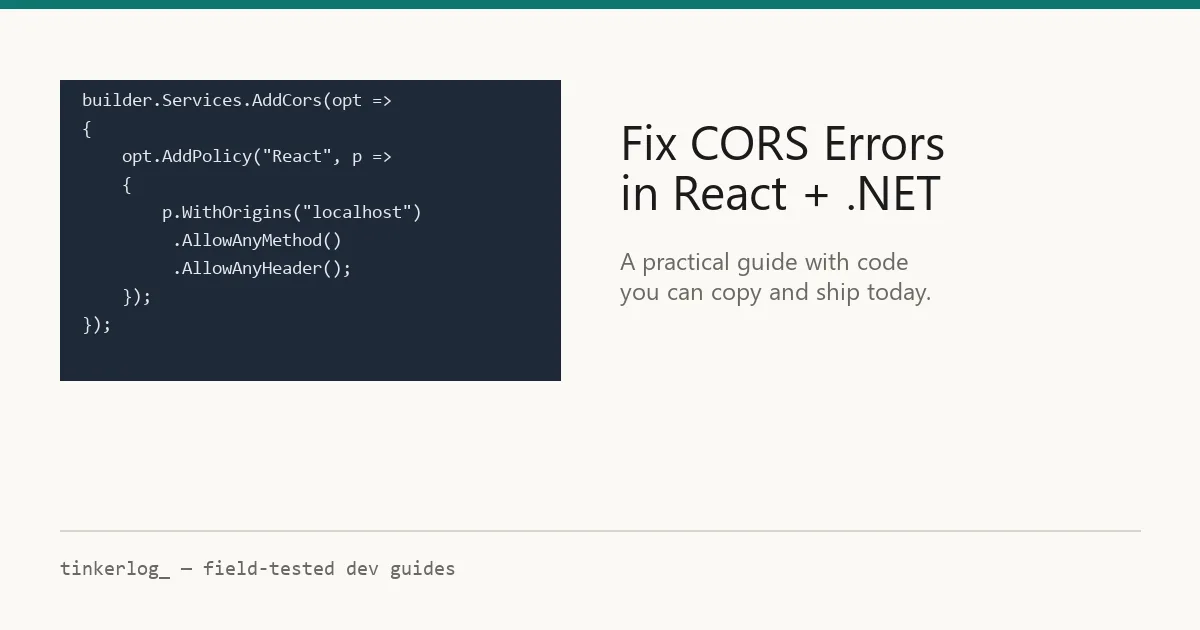
Fix CORS errors in React and .NET — a practical guide with real code
Step-by-step guide to fixing CORS errors between a React front-end and .NET API. Covers AddCors policy, preflight handling, Vite proxy setup, and common mistakes.
Field-tested AI & dev writing — no hype
Practical guides to free AI APIs, running local models, prompting that actually works, and the dev tools worth your time. Every guide is run start-to-finish before it's published — real rate limits, real errors, real fixes. When something stops being free, we say so.
The AI space moves fast and most of what's written about it is either marketing or a rushed rewrite of someone else's post. We do the opposite: we sit down with each tool, set it up from scratch, hit the errors you'll hit, and write down exactly what worked — including the limits and the catches the official docs gloss over.
Whether you want a free API key without a credit card, to run a model on your own laptop, or to write prompts that don't waste tokens, start here. It's free, it's tested, and it's written like a human wrote it.
The index
Five areas we cover in depth. Pick where you want to start.
Latest
Freshly published and recently updated.
Step-by-step guide to fixing CORS errors between a React front-end and .NET API. Covers AddCors policy, preflight handling, Vite proxy setup, and common mistakes.
Groq cut its free-tier rate limits roughly in half this week. What changed, what still works, and when to add a fallback.
Building a content site with core PHP, MySQL and 15KB of CSS on shared hosting — what the constraint taught us about modern web bloat.
Get a free Gemini API key in Google AI Studio in 5 minutes — with the real rate limits we measured and the data-training catch explained.
A year of daily prompting distilled: the patterns that survived are the ones that look like clear writing, not magic words.
OpenRouter reviewed after three months of daily use: real free models, measured latency overhead, and the rate-limit catch.
Why trust these guides
01 — Tested first
The screenshots are ours. The rate limits are the ones we actually hit. If a step failed for us, the fix is in the troubleshooting section — because it'll fail for you too.
02 — Dated & verified
Free tiers change and models get deprecated. Each guide shows the date we last re-ran it, with a public changelog when things move. No silently-stale posts.
03 — The catch, stated
Rate limits, data-training clauses, credit-card traps. Every "free" tool has a catch, and we put it in a labelled section instead of hiding it.
FAQ
Yes — every "free" guide covers genuinely free tiers or open-source tools, with no credit card required unless we say otherwise. We also spell out the real limits (requests per minute, daily caps) and any catch, like prompts being used for training, so you know exactly what "free" means before you commit.
Guides and reviews carry a "last verified" date showing when we last re-ran every step. We re-test popular guides on a schedule and whenever a platform changes its pricing or limits, and we log every change in a public changelog at the bottom of the post.
No. Guides are written for capable beginners: every step is spelled out, commands are copy-paste, and we explain the gotchas. If a guide needs a specific setup, prerequisites are listed up front so there are no surprises.
Often, yes. We cover free API tiers from providers like Google AI Studio, Groq and OpenRouter, plus running open-weight models locally with tools like Ollama — even on a modest laptop. Each guide tells you what hardware or limits to expect.
The guides stay free and open. The site is reader-supported and may show ads, and the newsletter is free to join. We do not take payment to review a tool favourably, and we tell you the downsides of everything we cover.
One honest email when new guides land.
No "AI revolution" spam. No daily digest padding. Unsubscribe anytime, no guilt trip.